
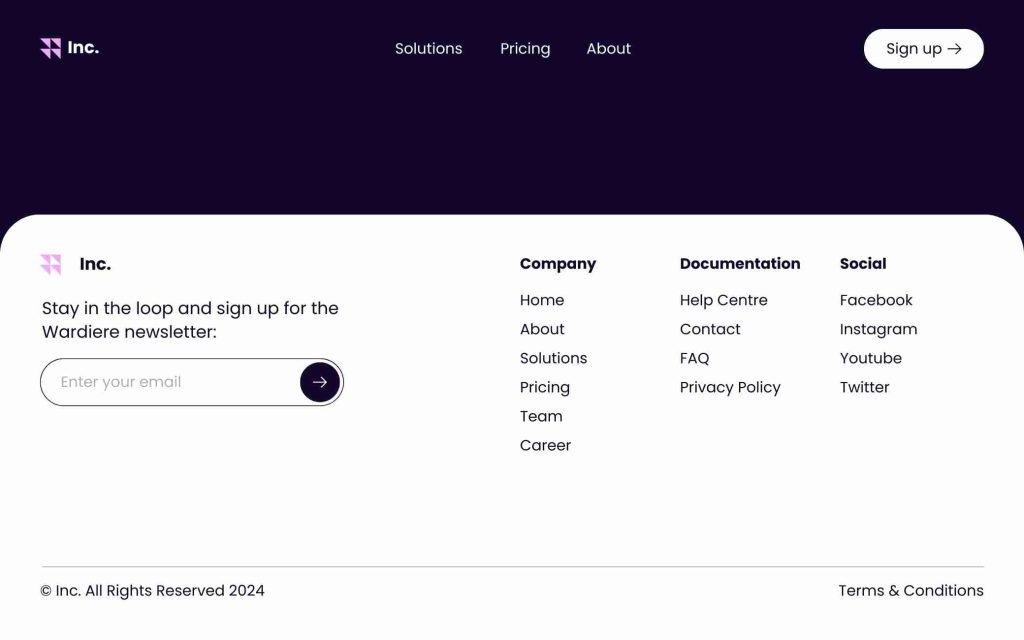
Website Footer Best Practices – The footer of a website often receives less attention compared to other areas such as the header or main content. However, it plays a crucial role in providing valuable information to users and enhancing the overall user experience. A well-designed footer can contribute significantly to the usability, accessibility, and search engine optimization (SEO) of a website. In this comprehensive guide, we will explore the best practices for designing an effective website footer that meets the needs of both users and search engines.
The Ultimate Guide to Website Footer Best Practices
A. Understanding the Importance of Website Footers
Before delving into best practices, let’s understand why website footers are essential:
Navigation Aid:
- Footers serve as secondary navigation, allowing users to find important links and information quickly. They help users navigate through the website and access key pages such as contact, about, and privacy policy.
Accessibility:
- A well-designed footer improves accessibility by providing alternative navigation options for users who may have difficulty accessing the main navigation menu.
Trust and Credibility:
- Including contact information, social media links, and privacy policies in the footer builds trust and credibility with users, demonstrating transparency and legitimacy.
SEO Benefits:
- Search engines crawl website footers to understand the structure and content of a website better. Including relevant keywords and internal links in the footer can improve SEO performance.
Conversion Optimization:
- Footer elements such as call-to-action buttons, newsletter signup forms, and related content links can help optimize conversion rates and encourage user engagement.
Now that we understand the importance of website footers, let’s explore the best practices for designing an effective footer.
B. Best Practices for Website Footer Design
1. Keep it Simple and Consistent
- The footer should maintain consistency with the overall design of the website. Keep the layout clean and organized, avoiding clutter and unnecessary elements. Use consistent typography, colors, and spacing to create a cohesive look.
2. Include Essential Links
Include essential links in the footer to help users navigate the website efficiently. Common links to include are:
- About Us/Company: Provide information about the company, its mission, and values.
- Contact Us: Include contact information such as email address, phone number, and physical address.
- Privacy Policy: Link to the privacy policy page to inform users about data collection and usage.
- Terms of Service: Link to the terms of service page outlining the terms and conditions of using the website.
- FAQ: Link to frequently asked questions to address common queries and concerns.
- Site Map: Provide a link to the site map for users who prefer a visual overview of the website structure.
3. Optimize for Mobile Devices
- Ensure that the footer is responsive and optimized for mobile devices. Test the footer layout on various screen sizes to ensure that it remains functional and visually appealing across devices.
4. Use Visual Hierarchy
- Use visual hierarchy to prioritize important content in the footer. Highlight key links and information using typography, color, or visual elements such as icons or separators. Make sure that essential information stands out and is easily accessible to users.
5. Include Social Media Links
- Integrate social media links in the footer to encourage users to connect with the brand on social platforms. Use recognizable social media icons and consider displaying follower counts or social proof to enhance credibility.
6. Incorporate Contact Information
- Make it easy for users to contact the website owner or support team by including contact information in the footer. Provide multiple contact options such as email, phone, and address, and consider adding a contact form for convenience.
7. Add a Call-to-Action
- Include a prominent call-to-action (CTA) in the footer to encourage user engagement. This could be a button prompting users to subscribe to a newsletter, download a resource, or explore a featured product or service.
8. Implement Accessibility Features
- Ensure that the footer is accessible to users with disabilities by following accessibility best practices. Use semantic HTML tags, provide alternative text for images, and ensure proper keyboard navigation for users who rely on assistive technologies.
9. Include Copyright Information
- Display copyright information in the footer to protect intellectual property rights and establish ownership of the website content. Include the copyright symbol ( ), the year of publication, and the name of the website owner or organization.
10. Test and Iterate
- Regularly review and test the footer to identify any usability issues or areas for improvement. Solicit feedback from users and analyze website analytics to gain insights into user behavior and preferences. Use this information to make iterative improvements to the footer over time.
C. Examples of Well-Designed Website Footers
To further illustrate best practices, let’s examine examples of well-designed website footers:
1. Apple
- Apple’s website footer is simple yet effective, featuring essential links such as About Apple, Contact Apple, and Legal. The footer maintains consistency with the overall design of the website and includes social media links for easy sharing.
2. Nike
- Nike’s website footer is visually appealing and organized, with clear navigation links and a prominent search bar. The footer includes links to important pages such as FAQs, Shipping Information, and Returns, as well as social media integration and newsletter signup.
3. Amazon
- Amazon’s website footer is comprehensive, featuring a wide range of links and resources for users. The footer includes links to Help & Customer Service, Careers, and Investor Relations, as well as accessibility options and language settings.
Conclusion: Website Footer Best Practices
A well-designed website footer is an essential component of a successful website, providing valuable information and navigation options for users. By following best practices such as simplicity, consistency, and accessibility, you can create an effective footer that enhances the user experience and supports your website’s goals. Remember to regularly review and update the footer to ensure that it remains relevant and useful to your audience. With careful planning and attention to detail, you can design a footer that leaves a positive impression on visitors and contributes to the overall success of your website.